Sysquake
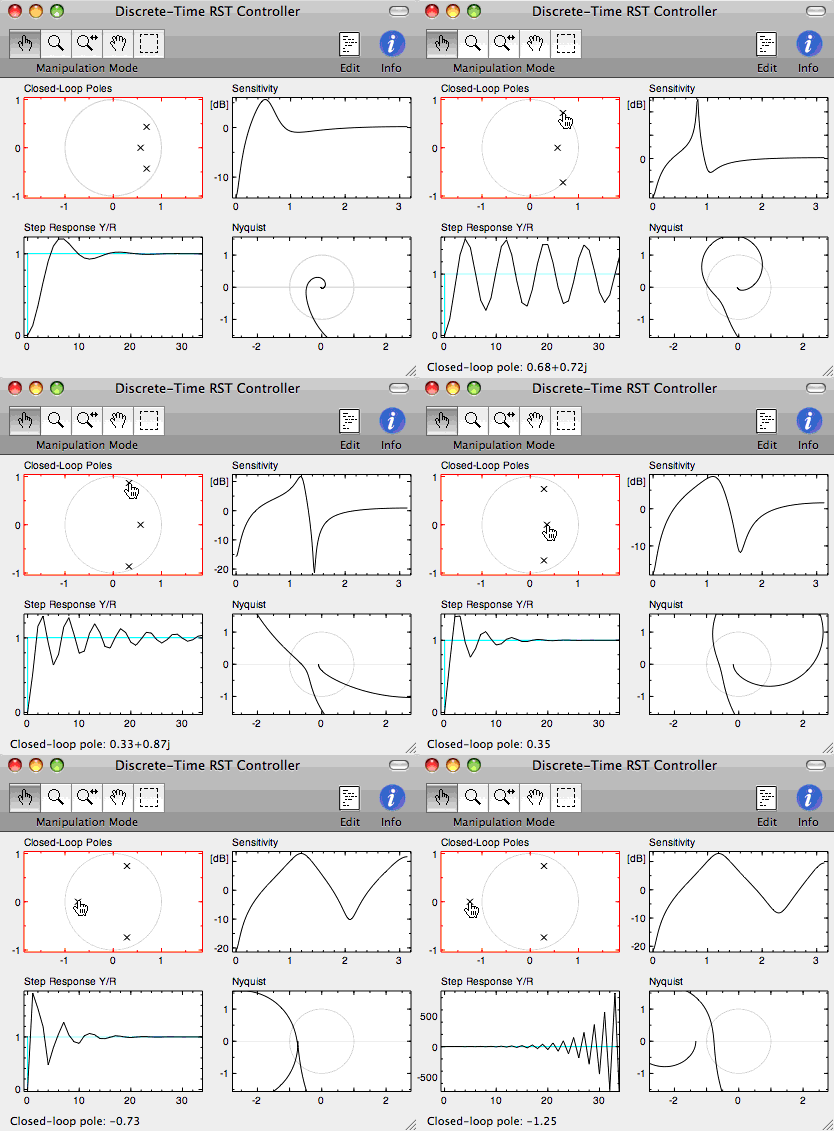
Sysquake is innovative, powerful and flexible software for understanding systems, solving problems, and designing products. What makes it special is its unparalleled graphical interactivity.
The four figures presented here show four different ways to represent a controlled system. Theory tells that the system is stabilized by the digital controller if the closed-loop poles are inside the unit circle, or if the point -1 in the complex plane is on the left of the Nyquist curve. Robustness margins give a numerical indication about how far the stability limit is. When you drag one of the closed-loop poles with the mouse (shown as crosses in the upper left figure), a new controller is computed and all the figures are updated nearly instantaneously. This aids in understanding how quantities are related to each other and designing better controllers extremely quickly. The animation shows several distinct values of the controller; but in Sysquake, you feel how the system responds to your manipulations and can observe, for instance, how the frequency of the step response is related to the position of the poles. And of course, you can enter the model of your own system, be it the electrical drive which sets the position of the head of a hard disk, the hydraulic systems which positions the flaps of the next supersonic jet, or the laboratory experiment of your tutorial.
Other screen snapshots of Sysquake for Windows, Sysquake for macOS, and Sysquake for Linux are available. They can be used freely provided they are not modified.
Sysquake can be used in many areas, including:
- automatic control
- analog and digital filters
- identification of model parameters and model validation
- robotics
- statistics
- physics
- demography
- finance
Simulation of dynamic systems can benefit greatly from Sysquake's interactivity. Parameters have often long-term effects which are difficult to deduce intuitively from the model or from a few static simulation graphics. With Sysquake, their manipulation will make apparent their role and which compromise may be obtained.
Features
- Powerful
- With a built-in language including more than 800 native functions, operators and commands easily extensible with your own, Sysquake can be used in a broad range of areas. Most functions accept arrays as well as scalar arguments. Native data types include real and complex numbers, integer numbers, boolean values, character strings, quaternions, lists, cell arrays, and structures. They can be extended with objects. Graphic functions include ones specific to dynamic systems (such as time and frequency responses) as well as general ones for displaying any kind of data.
- Fast
- What would be slow in a script written in a high-level interpreted mathematical language has been implemented very efficiently in native machine code. The mathematical interpreter itself is very fast.
- Ready to use
- Sysquake comes with a rich set of applications for a broad range of areas, such as classical control, robust control and digital filters.
- Easy to use
- The graphic user interface is very simple and intuitive. Multiple level Undo permits the user to experiment without the fear of losing performances obtained so far.
- Easy to extend
- Sysquake is based on LME, an interpreter specialized for numerical computation. Only the code necessary for displaying the figures and processing manipulations from the user is required. The management of graphics, zoom, saving and loading data, undo, etc. is provided by Sysquake. This results in small scripts, developed quickly and easy to maintain. Full access to the file system enables the exchange of data with other applications. The programs which come with Sysquake as text files can be studied to help you learn how to program Sysquake, modified if you have special needs, and reused in your own programs.
- Two means are available to extend LME, Sysquake's Matlab-compatible programming language:
- Libraries, which are collections of related functions, are written in LME and can be tested easily with Sysquake's command-line interface and built-in debugger and profiler. Object-oriented programming extends the kind of data which can be used directly by LME and contribute to make your code easier to develop and reuse.
- Extensions are developped with your standard compiler, such as C or Fortran; they offer high performance and permit the access to any hardware connected to your computer.
- Easy to integrate
- Sysquake uses text files for its programs and its data. You can create them by hand with any text editor and exchange data with other applications. Figures can be copied to other applications or saved as high-quality EPS files.
- To make easier the exchange of data between Sysquake applications or with other software, Sysquake supports an advanced mechanism based on the Copy/Paste paradigm. Data conversion is performed when necessary in a transparent way.
- Sysquake can also act as a server and accept requests from other applications to exchange data and notify them about user actions. The protocol is OLE Automation on Windows and XML-RPC on other platforms. For Java applications, SysquakeLink offers a high-level interface, common to all platforms.
- Application builder
- Sysquake Application Builder, provided with Sysquake, allows the creation of stand-alone applications which can be redistributed freely. For instance, you can back up a technical report with the software illustration of the performance of an audio filter, or give to your students the simulator of an economic system to be modeled without letting them see the source code. Sysquake Application Builder supports most Sysquake functions, with neither extensions nor the command line interface.
Supported Platforms
Sysquake runs on the following platforms:
- PC Pentium or compatible with Windows XP or Vista;
- Macintosh PowerPC or Intel with Mac OS 10.6 (Snow Leopard) or higher;
- PC Pentium or compatible with GNU/Linux, X Window and GTK+ 2.
Versions
Sysquake is available in two versions: Sysquake, with interactive graphics, advanced user interface and powerful programming language; and Sysquake Pro, with bundled extensions (I/O, databases, etc.) and support for your own, remote procedure calls, and Sysquake Application Builder.
Sysquake is free. Download it now!
Sysquake Pro is the professional version with these additional features:
- Extension files
- Extensions add new commands to the language of Sysquake. Amongst the extensions provided with Sysquake is Lapack, which adds high-quality linear algebra functions such as null for getting a basis for the null space of a set of vectors, and logm for calculating the logarithm of a square matrix; SerialPort, for communicating with devices using an RS-232 connection; and ODBC (Windows), MyExt and MySQL, for accessing relational databases. Sysquake also accepts extensions you develop yourself in C, for instance to connect to real-time acquisition hardware.
- Sysquake Application Builder
- Stand-alone applications can be created and distributed to colleagues, students, or on the Web without requiring your users to install anything.
- Technical support
- In addition to our Google group everybody may subscribe to, Calerga is committed to providing personal technical support and help to Sysquake clients.
A table summarizes the differences between the two versions. You can also browse its User Manual.
Purchase
Sysquake Pro is distributed directly by Calerga.
Sysquake can be downloaded from the Download page. Release notes describing recent changes are also available.